Power your experiences with Google Maps agent tools
Anchor your AI agents and applications in real-world context with Google Maps places, routes, weather, and UI components.
依托 Google 地图进行接地
Enhance your AI experiences with fresh data on 300M+ places worldwide, insights from user reviews, traffic-aware routing, and weather conditions.

Build richer experiences with built-in Google Maps UI components and let users discover and explore locations. Place visualizations are included at no extra cost.

Connect to any model via the Model Context Protocol (MCP) and get agent-ready responses that require no complex parsing, designed for faster and more efficient use.


Connect your AI to the real world with Google Maps Platform agent tools
Build experiences with Google Maps across any AI model or platform
Anchor your AI agents and applications in Google Maps' rich, dynamic context. Access places, routes, weather, and UI components via the Model Context Protocol (MCP) with Maps Experience agent tools, or natively in the Gemini platform, Gemini API, and Google AI Studio with Grounding with Google Maps.
Maps Experience agent tools
Unlock hyper-local context with insights based on millions of Google Maps reviews
Deliver nuanced, customized conversational AI experiences informed by insights from millions of Google Maps reviews and photos. Equip your agents with deep local context to understand user intent and resolve complex queries faster. Available in Maps Experience agent tools (via MCP) and Grounding with Google Maps (in the Gemini platform, Gemini API, and Google AI Studio).
依托 Google 地图进行接地
Optimize location-based experiences with traffic-aware routing
Empower your AI agents and users to plan multi-stop journeys across various modes of transportation. Proactively recommend points of interest, search for places along the route, and deliver precise, traffic-aware travel estimates. Available in Maps Experience agent tools (via MCP) and Grounding with Google Maps (in the Gemini platform, Gemini API, and Google AI Studio).
依托 Google 地图进行接地
Google Maps Platform agent tools
了解如何运用 Google Maps Platform 和 AI 构建新一代生成式地图应用。


找到适合所在行业的解决方案

Build with any LLM via the Model Context Protocol (MCP)
Maps Experience agent tools

Build in Gemini platform, Gemini API, or Google AI Studio
依托 Google 地图进行接地
How you can use Google Maps Platform agent tools
帮助旅行者规划和预订行程
利用谷歌地图和人工智能助手回复,帮助旅行者决定住宿地点、探索周边景点并更快地预订。在您的应用或网站上,根据用户需求提供定制摘要。


更好地告知房地产买家和租房者
通过提供社区信息,增强购房者和租房者的体验,并提升人工智能房地产助手的响应能力。此外,还可以根据房源页面上的租客资料创建自定义区域概览。


协调每一次行程
帮助团体自信地探索新目的地,从校园参观到城市短途旅行。用户可以共同研究和探索周围环境,利用对话式洞察力使团队后勤变得简单且协作。


Enrich your AI experiences with Google Maps place visuals at no additional cost
Bring the familiar Google Maps user experience into your AI applications. Maps Experience agent tools include ready-to-use place cards, so you can build richer applications faster. Display photos, ratings, and reviews, and customize them to your needs with minimal coding required.
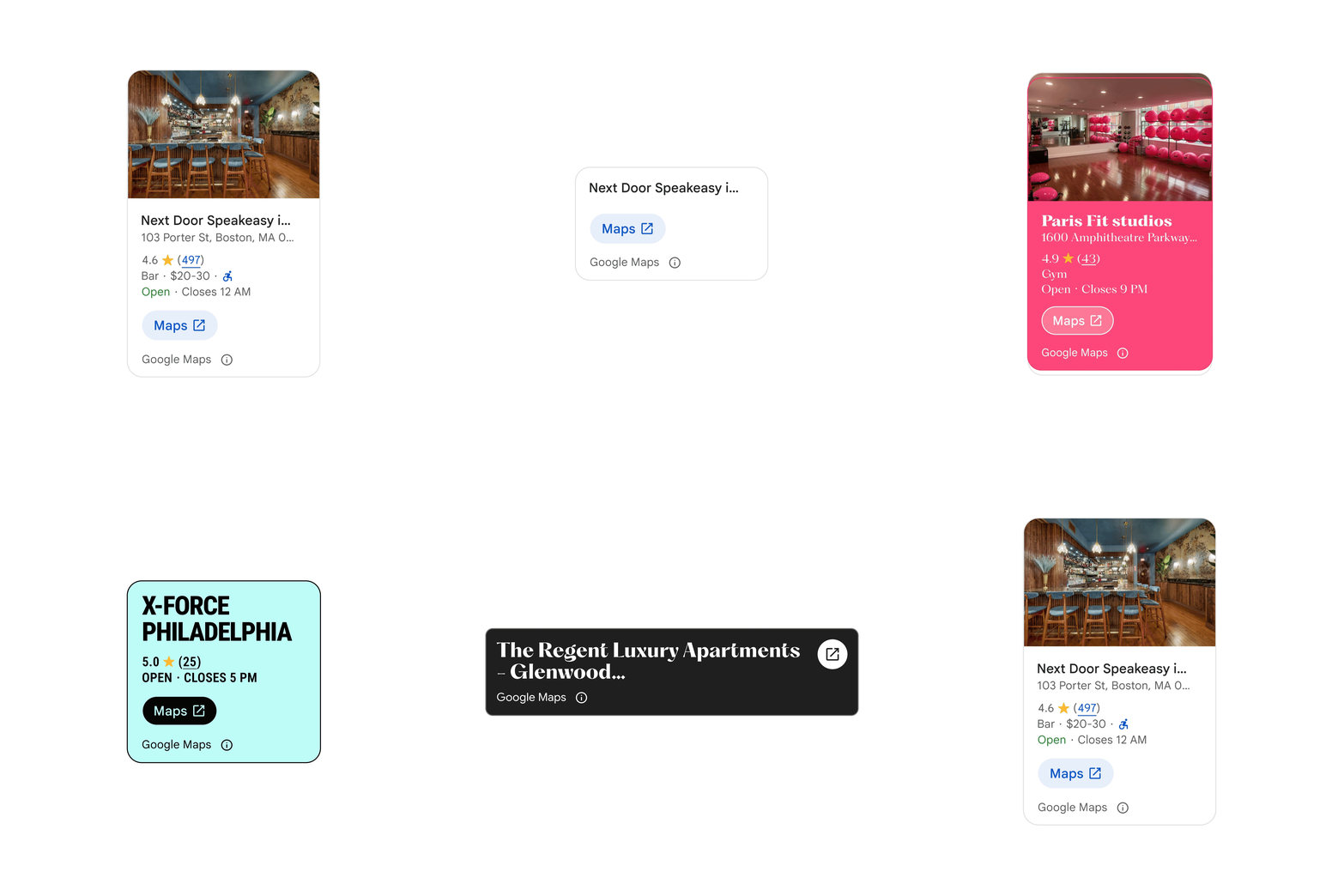
The Place Details component can be customized to change color, size and level of detail.
Seamlessly integrate Google Maps UI elements into your agentic applications
Geospatial context is most powerful when explored visually. This toolkit offers a streamlined destination for agentic instructions and modular UI components, making it easier for your AI agent to render interactive place cards, maps, and routes.

将生成媒体置于物理现实中
Maps Imagery Grounding in Gemini platform provides an authoritative foundation to ensure your AI-generated content is anchored in real locations. Create high-fidelity, immersive stories, allowing you to seamlessly insert your own subjects with global-scale accuracy, all while reducing production timelines and costs.
一张利用人工智能技术生成的华盛顿广场公园街景图像,图中出现了一艘宇宙飞船。
如何使用地图图像接地
在不可能的地方展示您的品牌
创建高度个性化的视觉素材,将产品或故事置于传统营销活动难以进入的标志性或偏远现实世界地点。

轻松完成商家取货
为用户提供实时精确的视觉环境,从识别特定店面到直接在应用程序内突出显示商业取货点,以减少停留时间并确保无缝交接。


Start building with Maps Experience agent tools

Start building with Grounding with Google Maps in Gemini platform
使用 Maps Agentic UI Toolkit 开始构建
Start building with Maps Imagery Grounding in Gemini platform


常见问题解答
Google Maps Platform agent tools are a set of agent-ready tools that equip AI agents and LLMs to ground, reason, plan, and visualize using real-world data about places, routes, and weather. Access them via the Model Context Protocol (MCP) with Maps Experience agent tools, or natively in the Gemini platform, Gemini API, and Google AI Studio with Grounding with Google Maps.
-
Use Maps Experience agent tools for multi-model flexibility to connect any MCP-compatible LLM or agent framework to Google Maps real-world context, with Places UI Kit included at no extra cost.
-
Use Grounding with Google Maps when building natively on Google’s AI stack in the Gemini platform, Gemini API, or Google AI Studio.
Google Maps Platform offers maps, routes, and place detail visualizations to help end users better understand geospatial context. Places UI Kit visualizations are included in the price of Maps Experience agent tools. Developers can either integrate Places UI Kit visualizations using the agentic data visualization token, or use the Maps Agentic UI Toolkit (Experimental) which also includes maps and routes UI components that are billed separately.
Maps Experience agent tools, a hosted Model Context Protocol (MCP) service from Google Maps Platform, connect any MCP-compatible LLM or agent framework to Google Maps places, routes, and weather—with built-in UI components when integrating the Places UI Kit or using the Maps Agentic UI Toolkit. Try it now or read the developer documentation.
Maps Grounding Lite is now Maps Experience agent tools. This service offers two tiers—Essentials and Pro—with expanded capabilities to answer more subjective, complex queries, including up to 10 place results, insights from millions of user reviews and photos, traffic-aware routing, and weather. It also includes Places UI Kit visualizations at no additional cost when using the agentic data visualization token. Contact sales to try Pro now.
Google Maps Platform agent tools are a set of agent-ready tools that equip AI agents and LLMs to ground, reason, plan, and visualize using real-world data about places, routes, and weather. Access them via the Model Context Protocol (MCP) with Maps Experience agent tools, or natively in the Gemini platform, Gemini API, and Google AI Studio with Grounding with Google Maps.
Maps Experience agent tools, a hosted Model Context Protocol (MCP) service from Google Maps Platform, connect any MCP-compatible LLM or agent framework to Google Maps places, routes, and weather—with built-in UI components when integrating the Places UI Kit or using the Maps Agentic UI Toolkit. Try it now or read the developer documentation.
-
Use Maps Experience agent tools for multi-model flexibility to connect any MCP-compatible LLM or agent framework to Google Maps real-world context, with Places UI Kit included at no extra cost.
-
Use Grounding with Google Maps when building natively on Google’s AI stack in the Gemini platform, Gemini API, or Google AI Studio.
Maps Grounding Lite is now Maps Experience agent tools. This service offers two tiers—Essentials and Pro—with expanded capabilities to answer more subjective, complex queries, including up to 10 place results, insights from millions of user reviews and photos, traffic-aware routing, and weather. It also includes Places UI Kit visualizations at no additional cost when using the agentic data visualization token. Contact sales to try Pro now.
Google Maps Platform offers maps, routes, and place detail visualizations to help end users better understand geospatial context. Places UI Kit visualizations are included in the price of Maps Experience agent tools. Developers can either integrate Places UI Kit visualizations using the agentic data visualization token, or use the Maps Agentic UI Toolkit (Experimental) which also includes maps and routes UI components that are billed separately.


