Power your experiences with Google Maps agent tools
Anchor your AI agents and applications in real-world context with Google Maps places, routes, weather, and UI components.
Powiązanie ze źródłem informacji przy użyciu Map Google
Enhance your AI experiences with fresh data on 300M+ places worldwide, insights from user reviews, traffic-aware routing, and weather conditions.

Build richer experiences with built-in Google Maps UI components and let users discover and explore locations. Place visualizations are included at no extra cost.

Connect to any model via the Model Context Protocol (MCP) and get agent-ready responses that require no complex parsing, designed for faster and more efficient use.


Connect your AI to the real world with Google Maps Platform agent tools
Build experiences with Google Maps across any AI model or platform
Anchor your AI agents and applications in Google Maps' rich, dynamic context. Access places, routes, weather, and UI components via the Model Context Protocol (MCP) with Maps Experience agent tools, or natively in the Gemini platform, Gemini API, and Google AI Studio with Grounding with Google Maps.
Maps Experience agent tools
Unlock hyper-local context with insights based on millions of Google Maps reviews
Deliver nuanced, customized conversational AI experiences informed by insights from millions of Google Maps reviews and photos. Equip your agents with deep local context to understand user intent and resolve complex queries faster. Available in Maps Experience agent tools (via MCP) and Grounding with Google Maps (in the Gemini platform, Gemini API, and Google AI Studio).
Powiązanie ze źródłem informacji przy użyciu Map Google
Optimize location-based experiences with traffic-aware routing
Empower your AI agents and users to plan multi-stop journeys across various modes of transportation. Proactively recommend points of interest, search for places along the route, and deliver precise, traffic-aware travel estimates. Available in Maps Experience agent tools (via MCP) and Grounding with Google Maps (in the Gemini platform, Gemini API, and Google AI Studio).
Powiązanie ze źródłem informacji przy użyciu Map Google
Google Maps Platform agent tools
Dowiedz się, jak tworzyć oparte na generatywnej AI aplikacje z mapami nowej generacji przy użyciu Google Maps Platform oraz AI.


Znajdź odpowiednie rozwiązanie dla swojej branży

Build with any LLM via the Model Context Protocol (MCP)
Maps Experience agent tools

Build in Gemini platform, Gemini API, or Google AI Studio
Powiązanie ze źródłem informacji przy użyciu Map Google
How you can use Google Maps Platform agent tools
Pomóż podróżnym planować i rezerwować wycieczki
Pomóż podróżnym zdecydować, gdzie się zatrzymać, poznać okolicę i szybciej dokonać rezerwacji dzięki Mapom Google i asystentowi AI. Oferuj niestandardowe podsumowania dostosowane do potrzeb użytkowników w swojej aplikacji lub witrynie.


Lepsze informowanie kupujących i wynajmujących nieruchomości
Zwiększ możliwości kupujących i wynajmujących, udostępniając im informacje o okolicy i udoskonalając odpowiedzi asystentów ds. nieruchomości opartych na sztucznej inteligencji. Możesz także tworzyć niestandardowe przeglądy obszarów w oparciu o profile najemców na stronach z ofertami.


Koordynuj każdą podróż
Pomóż grupom pewnie poznawać nowe miejsca, od wycieczek po kampusach po wypady do miasta. Użytkownicy mogą wspólnie badać otoczenie i poruszać się po nim, wykorzystując spostrzeżenia z rozmów, co upraszcza logistykę grupową i sprzyja współpracy.


Enrich your AI experiences with Google Maps place visuals at no additional cost
Bring the familiar Google Maps user experience into your AI applications. Maps Experience agent tools include ready-to-use place cards, so you can build richer applications faster. Display photos, ratings, and reviews, and customize them to your needs with minimal coding required.
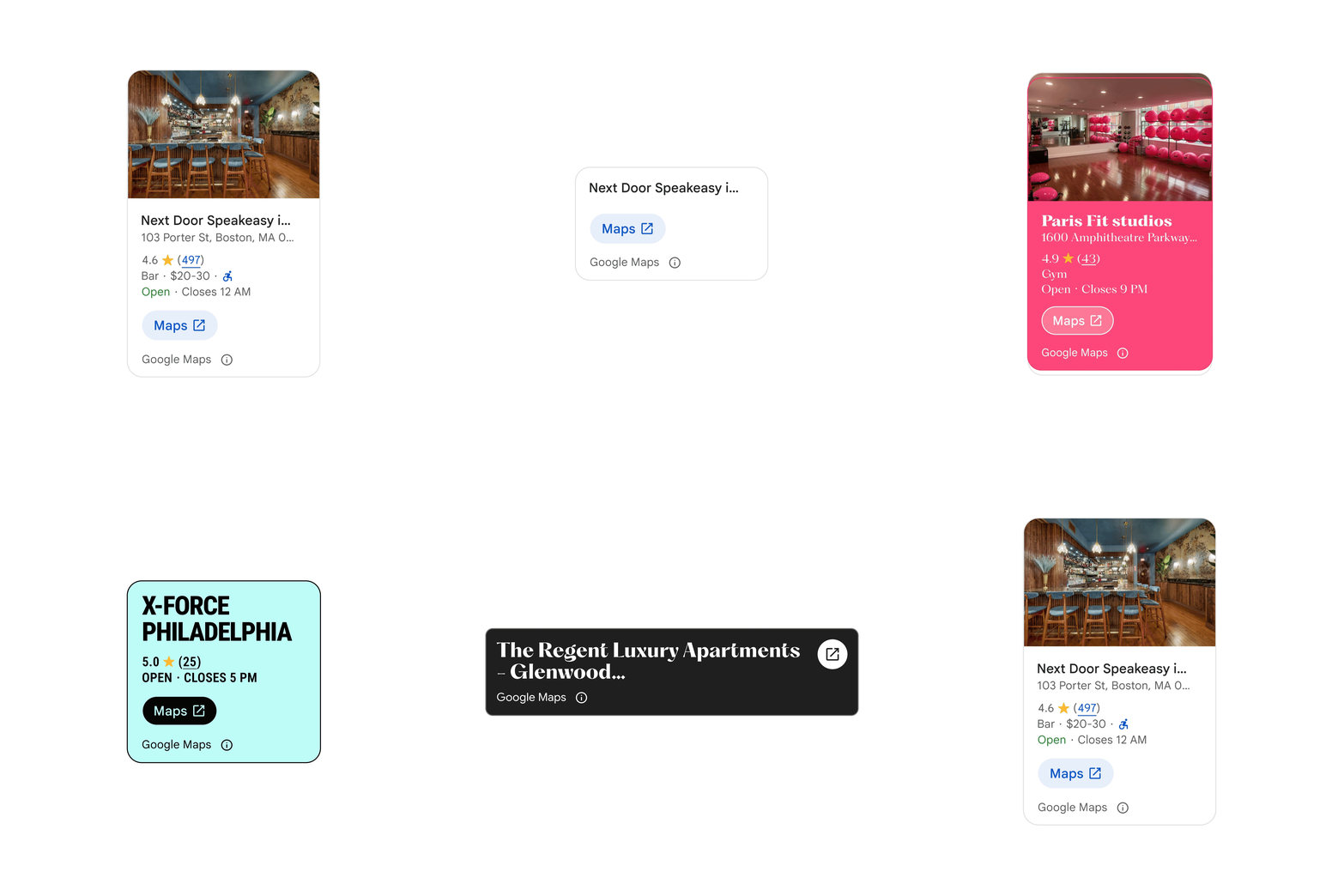
The Place Details component can be customized to change color, size and level of detail.
Seamlessly integrate Google Maps UI elements into your agentic applications
Geospatial context is most powerful when explored visually. This toolkit offers a streamlined destination for agentic instructions and modular UI components, making it easier for your AI agent to render interactive place cards, maps, and routes.

Media generatywne naziemne w rzeczywistości fizycznej
Maps Imagery Grounding in Gemini platform provides an authoritative foundation to ensure your AI-generated content is anchored in real locations. Create high-fidelity, immersive stories, allowing you to seamlessly insert your own subjects with global-scale accuracy, all while reducing production timelines and costs.
Obraz AI przedstawiający statek kosmiczny na zdjęciu Street View parku Washington Square.
Jak korzystać z Maps Imagery Grounding
Pokaż swoją markę w niemożliwych miejscach
Twórz niezwykle spersonalizowane zasoby wizualne, umieszczając produkty lub narracje w kultowych lub odległych lokalizacjach w świecie rzeczywistym, do których trudno dotrzeć w ramach tradycyjnych kampanii.

Łatwe nawigowanie po odbiorach u sprzedawców
Udostępnij użytkownikom precyzyjny kontekst wizualny w czasie rzeczywistym, od identyfikacji konkretnych witryn sklepowych po wyróżnianie punktów odbioru towarów bezpośrednio w aplikacji, aby skrócić czas oczekiwania i zapewnić płynne przekazanie zamówienia.


Start building with Maps Experience agent tools

Start building with Grounding with Google Maps in Gemini platform
Zacznij tworzyć z zestawem narzędzi Maps Agentic UI
Start building with Maps Imagery Grounding in Gemini platform


Najczęstsze pytania
Google Maps Platform agent tools are a set of agent-ready tools that equip AI agents and LLMs to ground, reason, plan, and visualize using real-world data about places, routes, and weather. Access them via the Model Context Protocol (MCP) with Maps Experience agent tools, or natively in the Gemini platform, Gemini API, and Google AI Studio with Grounding with Google Maps.
-
Use Maps Experience agent tools for multi-model flexibility to connect any MCP-compatible LLM or agent framework to Google Maps real-world context, with Places UI Kit included at no extra cost.
-
Use Grounding with Google Maps when building natively on Google’s AI stack in the Gemini platform, Gemini API, or Google AI Studio.
Google Maps Platform offers maps, routes, and place detail visualizations to help end users better understand geospatial context. Places UI Kit visualizations are included in the price of Maps Experience agent tools. Developers can either integrate Places UI Kit visualizations using the agentic data visualization token, or use the Maps Agentic UI Toolkit (Experimental) which also includes maps and routes UI components that are billed separately.
Maps Experience agent tools, a hosted Model Context Protocol (MCP) service from Google Maps Platform, connect any MCP-compatible LLM or agent framework to Google Maps places, routes, and weather—with built-in UI components when integrating the Places UI Kit or using the Maps Agentic UI Toolkit. Try it now or read the developer documentation.
Maps Grounding Lite is now Maps Experience agent tools. This service offers two tiers—Essentials and Pro—with expanded capabilities to answer more subjective, complex queries, including up to 10 place results, insights from millions of user reviews and photos, traffic-aware routing, and weather. It also includes Places UI Kit visualizations at no additional cost when using the agentic data visualization token. Contact sales to try Pro now.
Google Maps Platform agent tools are a set of agent-ready tools that equip AI agents and LLMs to ground, reason, plan, and visualize using real-world data about places, routes, and weather. Access them via the Model Context Protocol (MCP) with Maps Experience agent tools, or natively in the Gemini platform, Gemini API, and Google AI Studio with Grounding with Google Maps.
Maps Experience agent tools, a hosted Model Context Protocol (MCP) service from Google Maps Platform, connect any MCP-compatible LLM or agent framework to Google Maps places, routes, and weather—with built-in UI components when integrating the Places UI Kit or using the Maps Agentic UI Toolkit. Try it now or read the developer documentation.
-
Use Maps Experience agent tools for multi-model flexibility to connect any MCP-compatible LLM or agent framework to Google Maps real-world context, with Places UI Kit included at no extra cost.
-
Use Grounding with Google Maps when building natively on Google’s AI stack in the Gemini platform, Gemini API, or Google AI Studio.
Maps Grounding Lite is now Maps Experience agent tools. This service offers two tiers—Essentials and Pro—with expanded capabilities to answer more subjective, complex queries, including up to 10 place results, insights from millions of user reviews and photos, traffic-aware routing, and weather. It also includes Places UI Kit visualizations at no additional cost when using the agentic data visualization token. Contact sales to try Pro now.
Google Maps Platform offers maps, routes, and place detail visualizations to help end users better understand geospatial context. Places UI Kit visualizations are included in the price of Maps Experience agent tools. Developers can either integrate Places UI Kit visualizations using the agentic data visualization token, or use the Maps Agentic UI Toolkit (Experimental) which also includes maps and routes UI components that are billed separately.


