Power your experiences with Google Maps agent tools
Anchor your AI agents and applications in real-world context with Google Maps places, routes, weather, and UI components.
Google 지도 기반 그라운딩
Enhance your AI experiences with fresh data on 300M+ places worldwide, insights from user reviews, traffic-aware routing, and weather conditions.

Build richer experiences with built-in Google Maps UI components and let users discover and explore locations. Place visualizations are included at no extra cost.

Connect to any model via the Model Context Protocol (MCP) and get agent-ready responses that require no complex parsing, designed for faster and more efficient use.


Connect your AI to the real world with Google Maps Platform agent tools
Build experiences with Google Maps across any AI model or platform
Anchor your AI agents and applications in Google Maps' rich, dynamic context. Access places, routes, weather, and UI components via the Model Context Protocol (MCP) with Maps Experience agent tools, or natively in the Gemini platform, Gemini API, and Google AI Studio with Grounding with Google Maps.
Maps Experience agent tools
Unlock hyper-local context with insights based on millions of Google Maps reviews
Deliver nuanced, customized conversational AI experiences informed by insights from millions of Google Maps reviews and photos. Equip your agents with deep local context to understand user intent and resolve complex queries faster. Available in Maps Experience agent tools (via MCP) and Grounding with Google Maps (in the Gemini platform, Gemini API, and Google AI Studio).
Google 지도 기반 그라운딩
Optimize location-based experiences with traffic-aware routing
Empower your AI agents and users to plan multi-stop journeys across various modes of transportation. Proactively recommend points of interest, search for places along the route, and deliver precise, traffic-aware travel estimates. Available in Maps Experience agent tools (via MCP) and Grounding with Google Maps (in the Gemini platform, Gemini API, and Google AI Studio).
Google 지도 기반 그라운딩
Google Maps Platform agent tools
Google Maps Platform과 AI를 사용하여 차세대 생성형 지도 앱을 빌드하는 방법을 알아보세요.


내 업종에 적절한 솔루션을 찾으세요

Build with any LLM via the Model Context Protocol (MCP)
Maps Experience agent tools

Build in Gemini platform, Gemini API, or Google AI Studio
Google 지도 기반 그라운딩
How you can use Google Maps Platform agent tools
여행자들이 여행 계획을 세우고 예약할 수 있도록 도와주세요.
구글 지도와 AI 어시스턴트 응답을 활용하여 여행객들이 숙소를 정하고, 주변 명소를 탐색하고, 더 빠르게 예약할 수 있도록 도와주세요. 앱이나 웹사이트에서 사용자 요구에 맞는 맞춤형 요약 정보를 제공하세요.


부동산 구매자와 임차인에게 더 나은 정보를 제공합니다.
구매자와 임차인에게 지역 정보를 제공하여 역량을 강화하고, AI 부동산 도우미의 응답을 향상시키세요. 또한, 임대인 프로필을 기반으로 맞춤형 지역 개요를 매물 페이지에서 생성할 수 있습니다.


모든 여정을 조율하세요
캠퍼스 투어부터 도시 여행까지, 단체 여행객들이 자신감을 가지고 새로운 목적지를 탐험할 수 있도록 도와주세요. 사용자들은 대화 기반 인사이트를 활용하여 그룹 활동을 간편하고 협력적으로 진행하면서 주변 환경을 공동으로 조사하고 탐색할 수 있습니다.


Enrich your AI experiences with Google Maps place visuals at no additional cost
Bring the familiar Google Maps user experience into your AI applications. Maps Experience agent tools include ready-to-use place cards, so you can build richer applications faster. Display photos, ratings, and reviews, and customize them to your needs with minimal coding required.
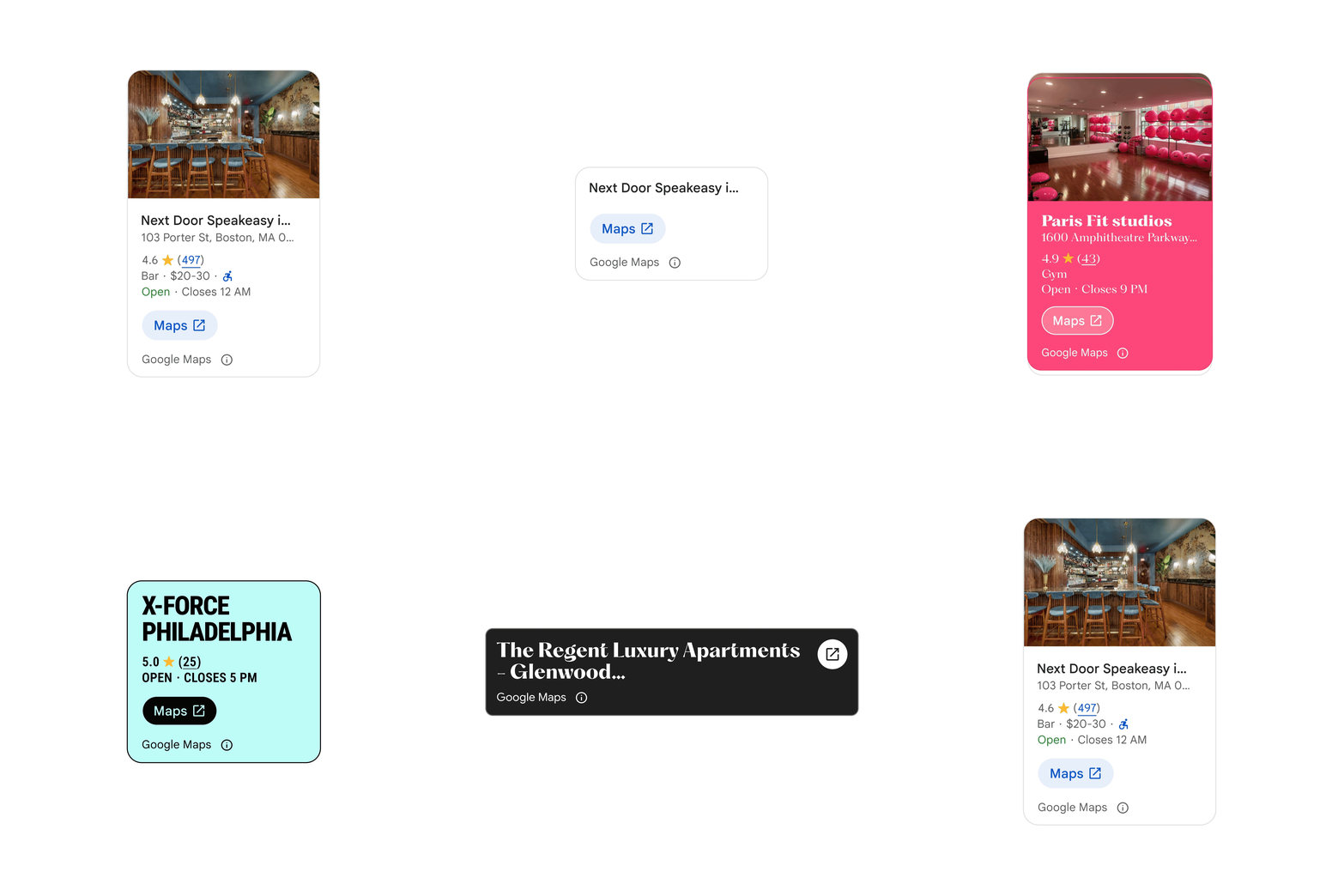
The Place Details component can be customized to change color, size and level of detail.
Seamlessly integrate Google Maps UI elements into your agentic applications
Geospatial context is most powerful when explored visually. This toolkit offers a streamlined destination for agentic instructions and modular UI components, making it easier for your AI agent to render interactive place cards, maps, and routes.

생성형 미디어를 물리적 현실에 기반을 두세요
Maps Imagery Grounding in Gemini platform provides an authoritative foundation to ensure your AI-generated content is anchored in real locations. Create high-fidelity, immersive stories, allowing you to seamlessly insert your own subjects with global-scale accuracy, all while reducing production timelines and costs.
워싱턴 스퀘어 파크의 스트리트 뷰 이미지에 나타난 우주선의 AI 이미지.
지도 이미지 접지 기능을 사용하는 방법
상상하기 어려운 장소에서 브랜드를 홍보하세요
기존 캠페인 방식으로는 접근하기 어려운 상징적인 장소나 외딴 곳에 제품이나 스토리를 배치하여 초개인화된 시각적 콘텐츠를 제작하세요.

가맹점 픽업을 간편하게 이용하세요
앱 내에서 특정 매장을 식별하는 것부터 상품 수령 지점을 강조 표시하는 것까지 실시간으로 정확한 시각적 맥락을 사용자에게 제공하여 체류 시간을 줄이고 원활한 전달을 보장합니다.


Start building with Maps Experience agent tools

Start building with Grounding with Google Maps in Gemini platform
Maps Agentic UI 툴킷으로 개발을 시작하세요
Start building with Maps Imagery Grounding in Gemini platform


자주 묻는 질문(FAQ)
Google Maps Platform agent tools are a set of agent-ready tools that equip AI agents and LLMs to ground, reason, plan, and visualize using real-world data about places, routes, and weather. Access them via the Model Context Protocol (MCP) with Maps Experience agent tools, or natively in the Gemini platform, Gemini API, and Google AI Studio with Grounding with Google Maps.
-
Use Maps Experience agent tools for multi-model flexibility to connect any MCP-compatible LLM or agent framework to Google Maps real-world context, with Places UI Kit included at no extra cost.
-
Use Grounding with Google Maps when building natively on Google’s AI stack in the Gemini platform, Gemini API, or Google AI Studio.
Google Maps Platform offers maps, routes, and place detail visualizations to help end users better understand geospatial context. Places UI Kit visualizations are included in the price of Maps Experience agent tools. Developers can either integrate Places UI Kit visualizations using the agentic data visualization token, or use the Maps Agentic UI Toolkit (Experimental) which also includes maps and routes UI components that are billed separately.
Maps Experience agent tools, a hosted Model Context Protocol (MCP) service from Google Maps Platform, connect any MCP-compatible LLM or agent framework to Google Maps places, routes, and weather—with built-in UI components when integrating the Places UI Kit or using the Maps Agentic UI Toolkit. Try it now or read the developer documentation.
Maps Grounding Lite is now Maps Experience agent tools. This service offers two tiers—Essentials and Pro—with expanded capabilities to answer more subjective, complex queries, including up to 10 place results, insights from millions of user reviews and photos, traffic-aware routing, and weather. It also includes Places UI Kit visualizations at no additional cost when using the agentic data visualization token. Contact sales to try Pro now.
Google Maps Platform agent tools are a set of agent-ready tools that equip AI agents and LLMs to ground, reason, plan, and visualize using real-world data about places, routes, and weather. Access them via the Model Context Protocol (MCP) with Maps Experience agent tools, or natively in the Gemini platform, Gemini API, and Google AI Studio with Grounding with Google Maps.
Maps Experience agent tools, a hosted Model Context Protocol (MCP) service from Google Maps Platform, connect any MCP-compatible LLM or agent framework to Google Maps places, routes, and weather—with built-in UI components when integrating the Places UI Kit or using the Maps Agentic UI Toolkit. Try it now or read the developer documentation.
-
Use Maps Experience agent tools for multi-model flexibility to connect any MCP-compatible LLM or agent framework to Google Maps real-world context, with Places UI Kit included at no extra cost.
-
Use Grounding with Google Maps when building natively on Google’s AI stack in the Gemini platform, Gemini API, or Google AI Studio.
Maps Grounding Lite is now Maps Experience agent tools. This service offers two tiers—Essentials and Pro—with expanded capabilities to answer more subjective, complex queries, including up to 10 place results, insights from millions of user reviews and photos, traffic-aware routing, and weather. It also includes Places UI Kit visualizations at no additional cost when using the agentic data visualization token. Contact sales to try Pro now.
Google Maps Platform offers maps, routes, and place detail visualizations to help end users better understand geospatial context. Places UI Kit visualizations are included in the price of Maps Experience agent tools. Developers can either integrate Places UI Kit visualizations using the agentic data visualization token, or use the Maps Agentic UI Toolkit (Experimental) which also includes maps and routes UI components that are billed separately.


